Showing posts with label gadgets. Show all posts

Saturday, September 2, 2017

Apple Airpods Review

RM 849 where they sell Apple stuff.
So after subtly hinting at the wifey using pinterest (Things i want at some point), i finally got my hands on the Apple Airpods. We still celebrate our "date-versarry" which was on the 30th of August, 12 yearsago. Man time sure flies when you're having fun eh?

Anyways back to the Airpods. For my "listening while commuting" pleasure, i have a Jabra Move over the ear headphones that has served me well. It's red and not discreet, but i've yet gotten anyone thinking that i was a DJ and ask me to spin some tunes yet. I was looking for something smaller and i did look around at other options but somehow i came back to the Airpods. The lure of yet another apple device is so strong!! But then again, the wife will never say anything if i wanted to get anything from Apple. They just work!

Unboxing
So we got mine at epiCenter at the Curve, she told me that she wanted to get it online from the apple store but it took almost 2 weeks for delivery. Who has time for that? So while we were out scoping out Ikea, we popped into the the first store that sold it and got it. I remembered when it first came out, it was really hard trying to get hold of one but i guess they've replenished the stock eh.

Minimalist packaging.
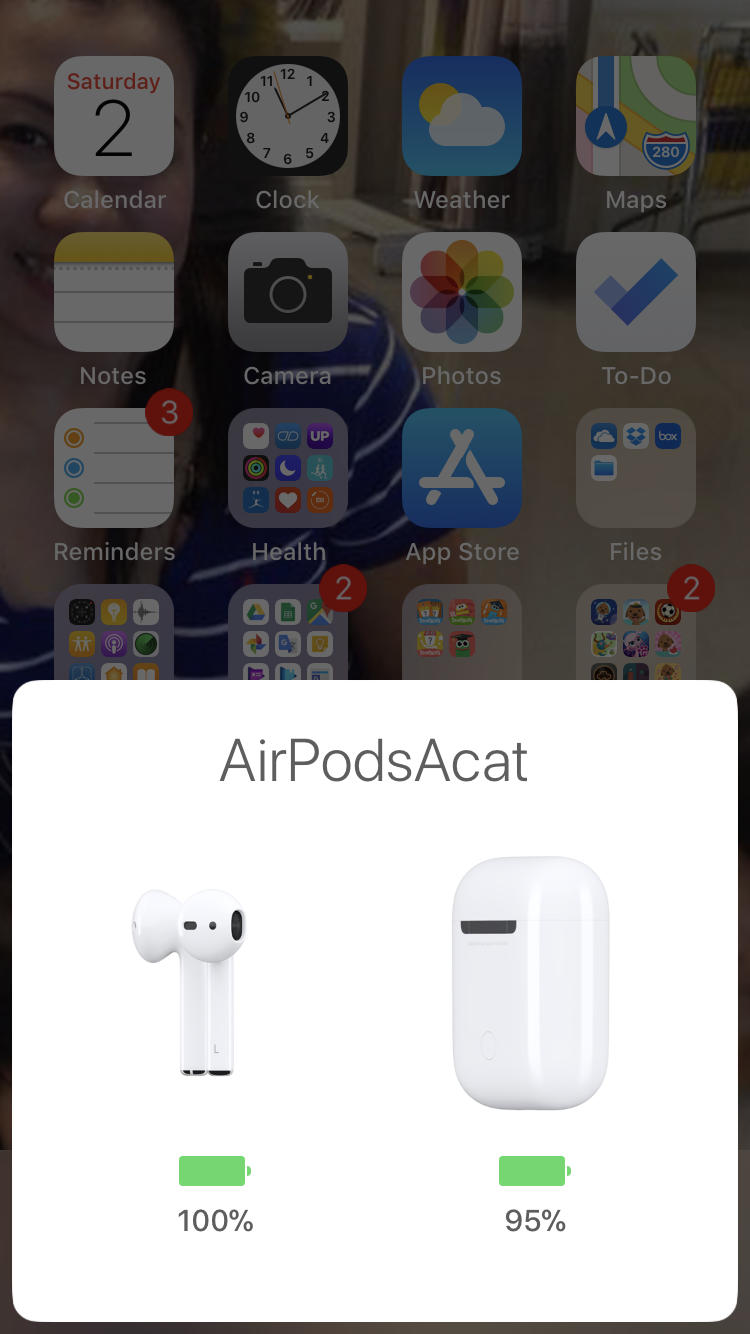
The first thing you will notice is how simple the packaging is, but then again if you're using Apple, its really all you can expect from them. The design language is consistent across all their products. There's some instructions and the Airpods in the charging case, and u get a lightning cable to charge the pods. Setting them up is easier than to set the apple watch. The first time you flip open the case, your phone will automatically detect and ask you to connect. That's it. Your done. Put them in your ears and you're good to go.
What you get in the box.
Flip it open and it automatically connects.
These are some very smart earphones. It has sensors that tells it if it is in your ears or if you have taken them out, stopping music and continuing it accordingly. You can program different actions when you tap on the Airpods, and you can have different actions for both left and right airpods. I set mine to call up siri on the left and skip to the next track on the right. But of course you can always google up the specs to know about the finer technical details of the airpods here.

Tada!
So how does it fare on normal use? So far i have only gotten a few minutes airtime whilst going to the carwash, but they sound good, but to be fair i'm not really an audiophile to be able to distinguish the different aspects of a good headphones. Calls sound clear and double tapping works as advertise. It fits me alright, tried jumping up and down and thankfully it stayed in my ears.
Settings appear and is accessible via the bluetooth options.
If the standard earpods that comes with the iphone fits than you won't have any problems with the airpods. In fact, it's difficult to tell them apart with a glance eh. Well the wires are a dead giveaway. You can use just the one airpod on its own, as a bluetooth headset, if you talk a lot then you would have one that can theoretically last you for days. 

Which is which?
Anyways, it's early days yet for me, and the Airpods does have a lot of potential. Here's hoping i don't lose them whilst out on a run or anything like that. Yeah right, me running eh. 

Tuesday, March 11, 2014

iPad Air first impressions.

Ladies and gentlemen. I have always loved the my fat iPad. Yeah sure i have since bought other tablets like the Asus Transformer, the Blackberry Playbook and the Samsung Galaxy Note 10.1, the original first generation iPad still holds a special place in my heart. So much so that I still keep it to entertain the kids and it is being utilised to the maximum.

So when it came to indulging my gadget acquisition syndrome, i finally decided on the iPad Air. The tablet is truly a magnificent engineering marvel. A slim and sleek design, gorgeous display and it just have a solid premium feel to it. Coming from a samsung tablet, the iPad Air oozes quality in its build and i'm not just saying this because i'm a fan.

In terms of the hardware specs, you can always argue that there are many other android tablets that have better configurations. But when it comes to Apple, what matters is how you utilize the hardware to provide the best user experience for their customers. This time, Apple have taken the Microsoft approach in bundling its best apps free with every new purchase. Productivity apps like Keynote, Pages and Numbers along with multimedia apps like iPhotos and iMovies along with GarageBand are now free. To me this is a very good move as Apple would make more money off selling their hardware and Apple users would get more from their devices right out of the box.

The battery life is as expected from any apple tablets. Its brilliant. You should expect a full working day use depending on your usage patterns. The iPad Air, despite being slim and thin is quite hefty to be used for long periods. If you want something as powerful but lighter you may wanna opt for the iPad mini with retina display. Its the same iPad inside and out only smaller. Okay that's stretching it a bit eh.

My planned usage scenarios would be to use the iPad as my main communication device when i'm at the office. So i've popped in a celcom simcard in and activated the LTE. And it flies. Again this will depend on your area of coverage but so far i've been getting good 4G signals around the house. I do believe that the iPad has more 4G bands covered compared to the iPhone 5 that i have so maybe that's another factor too.

I am now in the process of getting a good stylus for the iPad. That will be the only thing that i will miss the most from the Galaxy Note 10.1. There are some options out there which i may cover in later updates. 

I'll leave you guys to some comparison pictures of the iPad Air, the original iPad and the Galaxy Note 10.1 (2012)

Original vs Latest

Stacked

Stacked 2

Same screen size thinner bezel.

From the back

Note 10.1 vs iPad Air

Stacked 3

Compared

Thursday, January 23, 2014

Pebble smart watch review part 2

Okay after pretty much using the pebble for more than a week solid, i am in a more informed position to continue with the review. Here goes.

Battery Life
The box says to expect a battery life of between 5 to 7 days. I can safely say that this will depend on the amount of notifications that you set on receiving and also if u pull GPS location info from your phone to the watch or when u use the built in sports mode when you work out and stuff. I got almost 5 days use before i had to charge the watch, and this was after 3 sessions of running, almost all notifications turned on and a few install/re-install session of the beta 2.0 firmware. That's not bad considering some watches don't even last a full day.

battery indicator using the smartwatch pro app.

Applications


new 2.0 beta interface for the iPhone app.

apps for the iPhone.

So far I've found a few websites where you can download apps and watch faces for your pebble. Soon they will also launch with an official pebble store where folks can develop and probably monetize their apps on a common platform. depending on whether you are on android or iOs, the app selection slightly differs. and it also differs if you are running version 1.0 or 2.0 of the firmware. currently i have the following running on the watch.


Twebble - a twitter client that lets you compose tweets, check your timeline and even browse profiles.

check mentions..

Multi timer - allows you to set multiple timers counting down or up for whatever purpose.

basic timers..

Spoon - quick check ins on foursquare
Pebble cards - app that pulls info from various sources, rss feeds, stock quotes etc.

there are more apps coming out for the platform and it will be interesting to see how it develops.

Conclusion.
it is safe to say that a smart watch is not for everyone. but as more and more companies enter the game you can say that this will probably change later in the future. as battery life becomes better, and as more and more fitness based sensors are integrated in a watch, one can argue that maybe in the future every one will want to wear one. as for the pebble? yeah i would recommend it if you're looking for a smart watch that is. check out the pebble steel for a more professional look and a much heftier price.


Wednesday, January 8, 2014

Pebble smart watch review part 1.

What's the time?

So basically a smart watch is all about notifications. Making sure that you don't miss anything when you don't have your phones in your hands right. Which is these days kinda rare because you will always have the phone in your hands right? Well there are situations where you need to be discrete so I guess therein lies the need for the pebble. 

Pebble got its big break from kickstarter. It raised more than 10 million and basically kickstarted (no pun intended) the whole smart watch wearable craze. Now everyone is in on the ride. Even apple is rumored to be developing a smart watch and that would be something to look out for. But as it is now, we are looking at the Sony smartwatch 2 and also probably the Samsung galaxy gear as it's main competitors. The main advantage that the pebble has is its compatibility with both android and iOS users. 

Monday, January 6, 2014

pebble smart watch - wearables are where the future is at..


so i went and got the pebble. i guess the constant ads prompting me to get one finally did the trick and the fact that they offered me $15 discount pushed me to getting one. my last smart watch was a Sony. it did what it was supposed to do but it was a bit limiting since you needed to be constantly tethered to your phone for it to function. same can be said of most smart watches tho. but at least the pebble can still function as a watch if it is not connected.

anyways, i got mine directly from getpebble.com. it was a fairly painless exercise and they offered free shipping all over the world. so if you intend to get one you may want to opt for it. rather than go through mudah or ebay or any other re-sellers. look out for the occasional discounts you may get it cheaper too.

Tuesday, August 7, 2012

3M’s Scotch™ Premium Kitchen Scissors - a simple tool that does so much.

I am not sure about other mommies alike, but I for one am a gadget lover. I love gadgets and I love tools, especially those that I know would make life so much more convenient for me in the kitchen. I mean, I am not a natural kitchen lover. I cook because I want to cook but if I didn't have to do it, I would so welcome that change. And you know how I'd always look for ways to cut short time wasted in the kitchen so that I can spend more quality time with my kids outside of the kitchen. With gadgets and tools, I am able to achieve that.

When I mentioned the word, "gadget", I wonder if any of you own a pair of kitchen scissors? I know a lot of mommies would use normal scissors for stuff they need to snip. For me, I believe that every single stuff we do should have its own dedicated tool just like we need blusher brush for blushers, powder brush for powders and eyelash brush for eyelashes. You can't use a blusher brush for powders and vice versa (altho at times, I would do it ;P)

Kitchen scissors 1

Tuesday, June 12, 2012

Sony SmartWatch

what's the time?

i have been looking for this smartwatch since they announced it. must have not been looking hard enough coz i never did find any shops selling it. the smart watch pretty much evolved from the liveview, but adds a bit more functionality and style to the whole package.

the smart watch, as the name imply is just that - a smartwatch. meant to be use solely as a companion to your smartphone, the smart watch provides access to important information on your phone without having to actually open your phone. there lies its apparent weakness as it is pretty much useless without a phone.

designed as a sony accessory, the smartwatch still plays nice with other android phones as well. i'm paring the watch with a samsung galaxy note. the only drawback that u have is in terms of incompatibility of some sony specific apps. but third party app pretty much make up for it.

different views

the watch has 3 main views. the watch face. widgets and apps selection. you need to install the liveware app on your smart phone before u can start using it. u also need to install the smartwatch app, where u can manage all the widgets and apps and other information that appears on the watch. there's a facebook, twitter and music control app. phone book and other stuff. if u use endomondo then the smart watch extension acts as a display to show your workout statistics.

there is a market for smart watches these days. some noted project like the pebble has been gaining momentum and will likely be a competitor to the sony smart watch.difference is display tech means that the pebble will have longer battery life and is also compatible with the iphone. personally for me, i just want something that can compliment my galaxy note. u don't need to whip out the phone all the time just to glance at some basic info.

old school vs new school

plus i just love gadgets. hehe.

Saturday, March 24, 2012

What is your ultimate essential that you would bring if you're hospitalised?

To those of you who have been following me on twitter would know that I've been going through a hectic few days at the hospital as my baby is down with some weird tummy bug and infection of the lungs.

jebat chatting with mama
oh, don't worry, as of last night, he was as cheerful as ever and the doctor has allowed him to be off the drip *yeayy*

So, my topic for today would be, what are the essentials that you would pack apart from your clothes when you know you would be spending an x amount of nights at the hospital.

Some would tell me they'd bring some hydrating masks while some say they'd get plenty of magazines to read.

For me, my most precious possession that I would usually bring with me everywhere I go almost all the time, is this baby of mine...

the MacBook Air. Mine, I fondly call him, Vin ;)

I got Vin some time early last year since I have been travelling a lot for work and I totally hate lugging around those normal laptops that weigh a tonne! Well, I was heavily pregnant when I had to travel and I didn't need additional heavy stuff to weigh me down, especially since I had to carry it in my hand luggage.

I think the MacBook Air is a great investment. It is super quick - the screen starts almost immediately after you press the on button. If you need to put it to sleep, just push down the cover and when you need to use it back again, just lift the cover up and it is ready to be used without you needing to wait for it to warm up and the processor running. It is amazing.

Of course what I like about it most is that it weighs less than a kilogramme. And my friends who are used to those regular laptops or notebooks would always look so surprised when they see how simple and slim its charger.

macbook air in bag
Of course the greatest part about having the 11" MacBook Air is the fact that I can carry it in any of my handbags and no one would suspect anything. And, I have always, since 2007, buy handbags that can fit in a notebook/small laptop :)

Sometimes, when I'm in a rush and refuse to wait for a slow internet coverage, the speed of the MacBook Air processor helps quicken loading time. It just does.

Now before you ask too many questions, the MacBook Air is not for everyone and every type of use. With Mac machines, they're well known for their efficiency and stability, and widely used in design houses and advertising agencies.

The MacBook Air does not do that as its main function. As far as I understand, its slim size compromised that department and you do not have enough memory to run a design software (I think!). Therefore, it is more suitable for mobility and like me, I would use it for typing out documents and reports, and bring it around whenever I have presentations with clients. It is amazing.

Battery life is also quite efficient if the laptop is fully charged. It lasts for ages if you do not use any wifi or bluetooth connection and since usage is for specific functions, sometimes, you do not need to carry a charger.

There are still many notions that a Mac is difficult to use. I think this is a very old perception. You will never know until you own a Mac. Heck, even Mr Oosband fell deeply in love with my Mac Mini at home once he started using it. Macs are all so sleek and super sexy to me and although people refrain from buying it because it is considered expensive, I find that it is such a good investment because it hardly fails on you. In fact, before this, I was using the iBook G4 for a good 5-6 years until the screen went black, but it has never gave me any problems in that duration.

So here I am, able to watch my baby sleep while I type on its sleek and super smooth keyboard but I am able to do it because it is so easy to carry with me. I even had it along when I was hospitalised after giving birth to Jebat. I don't have to think twice about finding another bag and taking with me metres of charger that weighs pretty hefty. I've tried using Mr Oosband's eepc notebook and although it is cute and small, it still weighs a tonne.

charger
this is all there is.... you can fold in the top and bottom flaps but i use them to wind the cords around it.

I think one of the strengths that made the MacBook Air so high-tech is the touch pad when the new batch was launched last year (or was it end of 2010?). It works like a mouse and you can slide down the pages of the documents you read by using two fingers on the touch pad. You can even enlarge the screen view like how you would do it if you own a touch screen phone. And a double tap on the touch pad would be like you clicking on the function pad of a regular laptop to open up files. In fact, I would double tap my finger lightly on the touch pad to highlight a whole word.

I never see myself a gadget geek but the convenience of it all allows me to make full use of the gadgets I have.

What about you? What is your most prized possession that you would bring along with you even if the situation may not seem fit?

Monday, March 19, 2012

ps vita - bringing mobile gaming to the next level

by Acat, ze Oosband.


okay so i was eyeing the ps vita ever since it was announced last year. i had a pink fat psp which i sold off to buy a nintendo ds. but that's another story. anyways, the vita was definitely something of a gadget freak wet dream when it was announced.

so i was of course more than chuffed when i managed to cajole toughcookee into getting me one for my birthday. well its not until much later la of course but with the vita only recently being announced in singapore the price of grey imports were brought down quite significantly. the 3g version was selling for as high as RM2,500 in KLCC. of course that's your tourist price. but typically when u ask around, the average price is around RM1,700.

with the release of the singapore version, i think those folks who stocked up on the hong kong units may be forced to take some losses. in terms of compatibility its pretty similar. however buyers need to be careful when buying 3g units from the US as they are carrier locked which means that u can't use it with a local sim.

another thing that buyers need to know, since malaysia has not officially launched the ps vita, if you use a Malaysian playstation network id, you will not be able to access the ps store on the vita. yep. i tried using my main id and when i opened the ps store it just say that ur country is not supported. luckily i had a singapore unit and i could access the store. the only problem is the app selection and games were very limited. so i ended up creating another id. this time a US-based one and i think this could be the best option yet. not only are there more games selection, the apps are also a bit more. there's facebook, foursquare, etc. and there are also free games available to be downloaded occasionally.

so with that all of the way, i think i can start to do a proper review of the games console. but before we do that let's take a look at some pictures eh.

what u get with a value pack..

the bundled accessory pack

what u get in the main pack

the memory card and game..

proprietary memory card

charging the console..

okay now that the pictures are all out of the way, lets get to the nitty gritty review shall we? first and foremost the ps vita is a games console. and a games console is only as good as the games that can be played on it. and games are of course a bit of a subjective issue. what makes a game great? is it the gameplay? is it the graphics? sony has always nailed the graphics on its console. but in terms of gameplay nintendo is still the pioneer in terms of introducing touchscreen gameplay on the ds.

sony is however trying to catch up with the vita. the vita essentially is familiar if you are a sony fan. it improves from the old psp by introducing dual analog thumb controls, a touch screen and a fancy touch sensitive panel at the back. now i for one was a bit skeptical with the back panel but having played uncharted for a bit, the use of the back panel becomes almost natural.

sony has ditched the UMD format and has come up with another format for its ps vita game. now, you have the option of downloading the games from the ps store, but you definitely need a big memory card for that. the memory card that came with the bundle unit is only 4GB, and the size of the games are pretty huge. u will run out of space fairly quick. example, the uncharted is 3.2GB in size. imagine downloading that off the net.

the ps vita gamecard.

one criticism that folks had for the vita was the lack of built in storage. yeah. i guess it would have made sense to build that in but hey then you can't make money from selling proprietary cards innit?

okay now for the boring science bit. the vita is powered by a quad core cpu and a quad core gpu. it sports a 5 inch OLED screen. it comes with 512MB of RAM which is actually more RAM than a ps3. imma link you to the wikipedia entry for easy reference. connectivity wise, my vita is a 3G version. i'm using a digi simcard with it. it auto detects the settings but u can change the APN manually. there's also wifi and bluetooth which you can use as per whatever you normally use those for.

so basically the vita's user interface is governed by the live area. this is where you navigate to see all your apps and games. when you insert a game card, some game requires some storage on a memory card and essentially won't work if you don't have a memory card. same goes with apps.

speaking of apps, depending on ur ID, there's, facebook, foursquare, flickr and twitter app all free to be downloaded. this marks a change from the old psp. apps. now one would wonder if sony would have done better to stick android onto the vita and make it a more all rounded device. but hey i think they wouldn't wanna cannibalize sales of their phones.

so i think this should be enough for a start right? will update this review with more hands on usage later.. much much later.. well if i can put down the vita long enough to write the review la right? :)

have you checked it out yet?

Monday, February 6, 2012

Samsung Galaxy Note - A look from a mommy's perspective

Today I feel like talking about gadgets.

I think this blog is thirsty for a gadget review and although all these while, gadgets were reviewed by Mr Husband, today I feel like giving it a go, with a different perspective - from the eyes of a woman.

Therefore, if you expect some techie post, you'll be very disappointed because I don't believe a woman ever buys any gadget based on the RAM or memory size, at least not for me. To me, I would like my gadget to look uber gorgeous but not dumb inside. Hence, the usability must stand up to my highest standards according to my usage.

Like any gadgets, do not expect one thing to meet 100% of your needs. Gadgets are not as smart as [most] humans. Hence, reserve any comments to this post if you do not fully understand this paragraph ;)

So, today, I shall talk about my new baby who I fondly call, Arnold. He is a Samsung Galaxy Note who is uber gorgeous and perfect for a busy mommy like meself.

First of all, let me tell you that Arnold is also uber heavy. And I like that feeling knowing that I'd miss the weight if I suddenly forgot to put him into my handbag when I needed to go out and I like that I will be less clumsy with a heavy phone.

As you can see, it isn't that thin which is a minute factor for me simply because I love it for its super huge screen that has a sharp resolution - almost like you putting a high-res image on a computer. So surreal!

But of course, the main attraction that got me to fall in love with it was when I saw it on my BFF, Nicole. For someone who used the conservative 3310 for more than 5 years and then switched to another conservative phone, I was surprised that she picked this up and learnt to use it so quickly when she is never familiar with android phones. That said, the wallet-like cover that she had, made it look like a Chanel wallet and that was when I fell in love with it at first sight. Shallow, you think? Read on...

Another steal deal would definitely be the stylus. A phone with a screen that's almost the size of a pocket computer and writing capabilities should be a dream gadget for busy mommies, definitely. Some are just clumsy to type on the virtual keypads and prefer to write, while the Samsung Galaxy also allows pretty darn good voice command features if you are the type who likes to tell a gadget what to do. I cannot comment much about the voice command feature as I hate talking to gadgets but I know Mr Husband does use it frequently on his Galaxy SII and I guess it is good because he says so ;P

Now the size is somewhat of a mix of hits and misses. Above is the photo of a Note in between the HTC Windows phone (left) and Galaxy SII (right).

I was surprised at the so many admirers of the Galaxy Note for its functions, features and speed yet they are willing to forgo the experience only because they think the phone on one's ear looks uber weird.

Look, first of all, there is always a solution to every problem. Secondly, there is this thing called the bluetooth headset, in case you have never heard of it??

But thirdly, which is what I truly feel - who cares how stupid it looks on a person's ear... you don't own one, do you? Therefore, you simply cannot comprehend how wonderful it is to use it. It's almost like god's gift, I tell ya! So what if it is huge and fugly? When you're in love, it becomes just perfect for you, no matter what others say ;)

And if you think battery life is a bane for all android devices, read the above paragraph again on what I said about a solution to every problem... when I am in the car, I would plug it into the car charger and when it is in my handbag, I have it plugged in to the battery charger pack (as in the picture above) that I'd carry in my handbag at all times.

So you wanna tell me more negative points? I will combat it with such easy solutions, you may never even think of ;)


Favourite apps

Next, I shall talk about my favourite apps. As it is with android phones, there are plenty of apps that you can download for free from the Market. If you are an iPhone user, I guess you may say that iPhone has more apps than an android. As I have never used an iPhone before, I may not be able to comment much on this though I am a heavy user of mac (I have the mac mini as my desktop, a macbook air as a laptop and Mr Husband owns an iPad).

But all things mac may be a little boring because familiarity breeds contempt. Haha, well that wasn't exactly why Mr Husband and I do not own an iPhone.

Now, I can talk about so many apps until the cows come home, so I guess I will just touch on some of them. Who knows, if this post is popular enough with mommies alike, I may one day do reviews on apps alone :)

1. The Mini Diary
When I was using Mr Husband's Galaxy SII, I fell in love with the Mini Diary. It is almost like a simple blog to me because I can easily paste a photo, put up the location and describe what I did that day, offline. Isn't this one just cute? I can document everything that I've done, even put photos of all those dishes I cooked and write about them so that I could flip the pages one by one and glee in awe as I read what I did days back or weeks back. I so love this app.

It works just like a diary only that you're not able to share it with friends and there's no password option, in case someone decides to look into your phone. That said, if password is what you need, I guess you would be smart enough to lock your screen first and no one can check anything.

As for sharing a page with someone, I have tried sharing a page on facebook but it came out as a photo with description instead of the actual look and feel.

2. The S Memo
Then, comes the point where I said that it has handwriting capabilities for clumsy mommies. This is the S Memo where you can do almost anything. Save them, and this page will appear when you click on S Memo so that you can see your previous saved documents and just touch on it if you want it open.

Well, I shouldn't brand this app for only busy mommies. I'm sure you ladies would have so much fun using this app too. But I wouldn't know because I am a busy mommy ;D

3. The SwiftKey X
But if you think you want to use the keypad, I would highly recommend this SwiftKey X app. I think you'd need to purchase it from the Market but it is worth the buy! The keypad actually learns up your typing pattern and it will predict what you're trying to type so that you will not have to type a whole word everytime. For this, I had programmed it to learn my typing patterns from my gmail, facebook and twitter accounts, and not forgetting the sms as well.

So, when I type just 'He', the tab 'Hey', 'He' and 'Hello' comes out. The more alphabets you type in, the more accurate the tabs will predict the words you're trying to type out.

The positive side of it is that if you're trying to send the same message on several applications, you do not need to copy paste a sentence. It will automatically learn the sentence and predict even before you type the next word! Amazing!

4. Business Calendar
And this one? I have loved this app since the day I used the android Xperia x10 mini. It is a free app called, Business Calendar. Even though free, the app comes in many different widgets for you to choose to place on your home screen, just like what you see at the picture on the very top of this post.

Yes, the Samsung Galaxy has its own very sexy calendar but I much prefer the Business Calendar because it has all my gmail calendars as tabs underneath the calendar (and I can personalise the colours for each calendar). I have a host of email accounts, one with my full name, one I use for work, one for blogging usage and another one for my business use, and so this calendar fits my needs to a T. I also share a calendar with Mr Husband and some other users/functions (which I did not highlight on the calendar unless I need to). Therefore, as a kiasu lady, I know that all those I need is there when I need them but until then, I at least have my personal schedule and Mr Husband's schedule on my phone. I love this app!

And if you need a week view, you can just swipe the week using the stylus and this page will appear. Another plus point there - where you can choose the number of days you want displayed!

5. Photo editing app
This one's another love of mine, introduced by Mr Husband. The pixlr'o'matic allows the most amateur photographer to have an almost professional touch! But that's not the main deal. I guess for the most part, one should NOT compare an 8mp camera phone to an actual 8mp camera. It isn't that great although you should get used to the functions in order for you to get the most of the camera's capabilities (and it can surprise you too). And this app actually makes photo-taking a lovely experience. Just look at the photo below...

It has many different features and after creating a fine border, a normal photo of a capuccino and mocha gets a nice treatment. You can make a sharp photo look blur and a new photo to look ancient. You can have a warm tone look cold and even add details like lights and rainfall to it. It is amazing, and it is FREE! :) When you're done with it, you can share it on Whatsapp or Twitter or fb or even email it to friends! Love love!

6. Cooking app
Now, this app was probably initially designed to be used in an iPhone. It can be downloaded from the Market to your android and it is one of my favourites. I mean, a Note is almost like a pocket computer to me and with this app, I just need to bring the Note with me into the kitchen and I can create magic. Love x3!

7. Games and Entertainment
While waiting for food to be cooked on the stove, I have my virtual kitchen to take care of... this is my bakery, downloaded from the free Bakery Story app. It is almost like Cafe World to users of fb only that this one allows me to be totally anonymous and getting neighbours is a breeze because we hardly know one another. I love this game!

And because I like cooking so much, I also downloaded Restaurant Story. Two huge virtual kitchen and one actual kitchen to take care of, mommy's a busy lady already ;)

8. Mommy's Calendar
And because mommy's so busy, mommy needs an app to tell her when she'll transform into a lion with an awful mood at that time of the month, when she is fertile to have more cubs and many more features which I have yet to discover ;P

This one's an app I purchased because the free version doesn't have a widget. A busy mommy needs her widget. Always.

And unlike the apple store, the Android Market allows a full refund within 15 minutes of purchase if you're not happy about the app. But then again, if you're a smart mommy like moi, you should try out all the free versions relevant to your usage before you decide which one is going to be worth the purchase. Am I right or am I right?

So, to conclude, this is my note on my Note. As seen here, my home screen where I have loads of widget and apps. On the top, is a Galaxy exclusive, me thinks. I have all the cute photos screen played live so that I can look at them every time I miss my munchkins. Heck, I even have pictures of dishes I've cooked just so that the stream of pictures would look enticing ;) mommy loves....

The super large screen allows for more apps and programmes to be placed on the home screen. Of course, you can have more pages if you have more apps but I prefer the important ones to be placed at the most front, within easy reach.

And there on the left side is one of the widgets from the business calendar. There are plenty of variations and size options but I chose this size as it looks just perfect.

So, you'd ask me what I think of the Samsung Galaxy Note... and I'd say, it is just perfect.

Do you own a Note? Don't you just love it?